The Best golf launch monitor for simulators blends accuracy, software, and space needs.
You want the feel of a real round without leaving home. You also want data you can trust when you practice. A good launch monitor ties your space, your swing, and your software together. It can turn a spare room into a tour range. It can show you spin, launch, and path in plain numbers and video. In this guide, I share what to expect, where budget meets precision, and how each device fits different rooms and goals. I’ve tested, compared, and simplified so you can make a smart choice today.
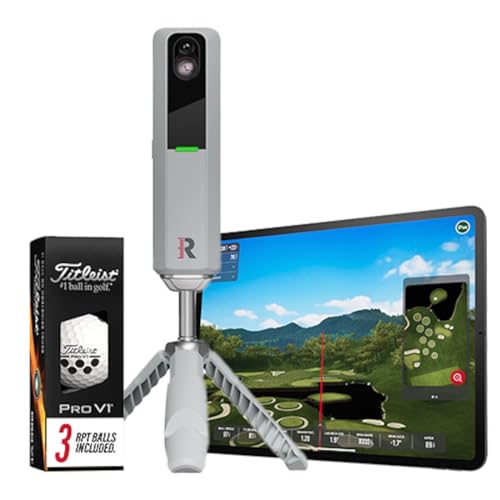
Rapsodo MLM2PRO Golf Launch Monitor,…
Advanced Golf Launch Monitor – The Rapsodo MLM2PRO golf launch monitor delivers pro-level accuracy, measuring 13 core golf metrics, including spin rate, spin axis, and swing speed, making it a…

Rapsodo MLM2PRO Golf Launch Monitor,…
Advanced Golf Launch Monitor – The Rapsodo MLM2PRO golf launch monitor delivers pro-level accuracy, measuring 15 core golf metrics, including spin rate, spin axis, and swing speed, making it a…

Rapsodo – Mobile Launch Monitor…
Pro-Level Golf Launch Monitor with GPS Tracking – The Rapsodo mobile launch monitor delivers tour-level accuracy for shot distance, ball speed, club speed, and launch angle, with GPS satellite view…
Rapsodo MLM2PRO (3 RPT Pro V1 Balls)

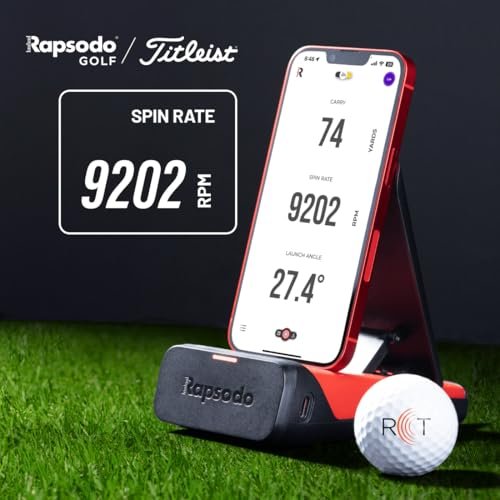
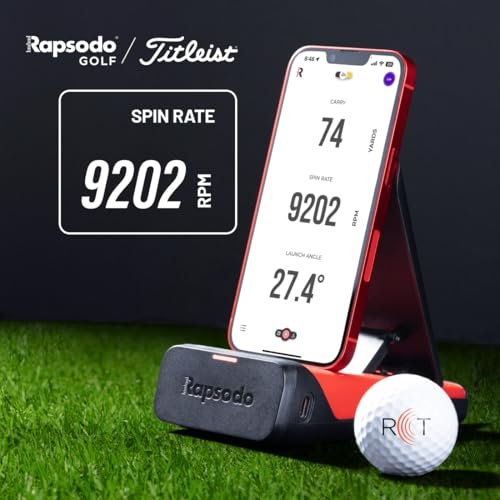
The Rapsodo MLM2PRO hits that sweet spot between price, purpose, and real data. It pairs radar with dual cameras to track your ball and club with striking clarity. Use the Impact Vision to see strike location in slow motion. Use Shot Vision to trace your ball in flight and confirm your start line indoors or out.
With RPT/marked balls, the unit reads spin rate and spin axis. That makes your simulator sessions feel honest, not guessed. The app is easy to use and the video overlay is gold for practice. It supports popular sim apps and feels at home in tight spaces if you set it up right.
Pros:
- Dual camera + radar reads spin with marked balls for better accuracy
- Impact Vision slow-mo helps find heel, toe, or low-face strikes
- Solid sim integrations like E6 Connect and Awesome Golf
- Portable and quick to set up indoors or at the range
- Clear data overlay on swing video aids instant feedback
- Good value for the performance and features
Cons:
- Marked/RPT balls needed for true spin axis and rate
- Some sim features require a paid membership
- Setup needs proper spacing to reduce misreads
My Recommendation
If you want tour-style feedback without a tour budget, this is a great pick. It makes a strong case as the Best golf launch monitor for simulators under the midrange price band. I like the video tools and the clean app the most. It’s a smart step up from basic radar and a smart step down from ultra-premium boxes.
| Best for | Why |
|---|---|
| Serious home practice | Spin axis with marked balls and slow-mo impact video |
| Small to mid rooms | Compact unit with workable indoor spacing |
| Video-driven learners | Shot/Impact Vision with data overlay is clear and fast |
Rapsodo MLM2PRO (12 Pro V1 Balls)
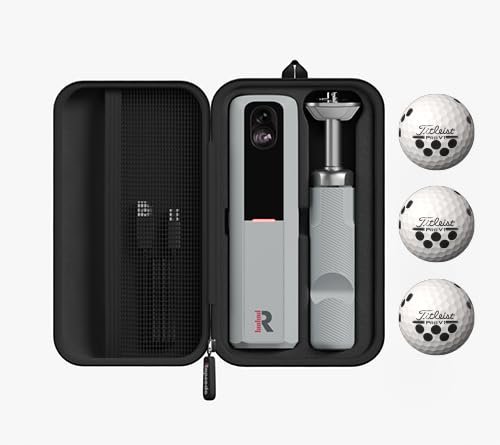
This bundle includes more RPT/marked Pro V1 balls so you can lock in spin data. That matters when you care about start lines, curvature, and wedge gapping. The hardware mirrors the standard MLM2PRO, so you get Shot Vision, Impact Vision, and dual-camera precision. The app experience stays quick and friendly.
I like bundles for simulator use since marked balls tend to vanish or scuff. More balls mean fewer breaks to hunt backups. The device connects to top sim apps and feels stable indoors. It’s a very practical way to get the same accuracy with a fuller ball stash from day one.
Pros:
- Includes extra marked balls for consistent spin readings
- Same dual cameras and radar for robust tracking
- Strong sim app support for quick course play
- Video capture adds context to numbers
- Great for wedge practice and curvature control
- Portable for indoor and range work
Cons:
- Higher bundle price versus the base kit
- Membership still needed for some features
- Alignment and spacing must be dialed in
My Recommendation
Want the same strong platform with less fuss over marked balls? This is the simpler route. For players who plan long sim sessions, this bundle is a smooth fit. It earns a spot in any shortlist for the Best golf launch monitor for simulators in the value-to-performance class.
| Best for | Why |
|---|---|
| Simulator bundles | Extra marked balls keep spin data consistent |
| Curvature training | Spin axis data supports shaping and start-line control |
| Busy households | More balls reduce downtime during practice |
Rapsodo Mobile Launch Monitor (iOS Only)

The original Rapsodo MLM is a pure value play for iPhone and iPad users. It gives you video with shot tracing and basic ball and club data. GPS shot mapping helps you see dispersion and distance across a range session. Setup is quick, and the app is still one of the easiest to learn.
It estimates spin rather than reading it, so curve and wedge control are more ballpark. Indoors, it prefers longer ball flight. Still, for the price, it is a strong way to build a data habit and see your swing on video. It is a smart starter option if you’re not yet ready for the higher-end gear.
Pros:
- Very budget-friendly
- iPhone/iPad video with shot tracer is helpful
- Fast setup and clean app design
- GPS shot mapping shows true dispersion
- Great for building a practice routine
Cons:
- iOS only
- Spin and curve are estimated, not measured
- Short indoor spaces can be tricky
My Recommendation
If you are new to launch monitors and on iOS, start here. It won’t replace a pro unit, but it gets you into the habit of data-driven practice. It is not the Best golf launch monitor for simulators, but it’s a fair, low-cost way to learn what you need next.
| Best for | Why |
|---|---|
| Budget users | Low price with video and shot trace |
| Range sessions | GPS mapping and fast setup |
| iOS owners | Tight app integration and ease of use |
Garmin Approach R10 Portable Launch Monitor

The Garmin Approach R10 is a pocket-size radar that punches above its price. It brings 10 hours of battery life, easy iOS/Android support, and a strong app. You can play virtual courses and record swings with data overlays. The unit is light and reliable once you dial in the spacing.
It estimates some metrics like spin axis, so ball curve is a guide, not gospel. Indoors, it needs enough ball flight for the best reads. Still, it is a favorite entry to midrange pick. If you want to learn with a low footprint and fair cost, this is a great way in.
Pros:
- Portable with long battery life
- Works on iOS and Android
- Good sim support and virtual golf
- Video with data overlay helps fast learning
- Excellent value for many golfers
Cons:
- Spin axis is estimated
- Needs adequate indoor ball flight for best accuracy
- Can be sensitive to radar noise in tight rooms
My Recommendation
For many golfers, the R10 checks every box that matters. It is light, long-lasting, and fun to use. If you want a low-hassle pick that still works well in a sim, this is in the running for the Best golf launch monitor for simulators at a friendly price.
| Best for | Why |
|---|---|
| Budget simulators | Great price-to-feature balance |
| Mobile users | Strong iOS/Android app with virtual courses |
| Frequent travelers | Lightweight and 10-hour battery |
Garmin Approach R50 Touchscreen Launch Monitor

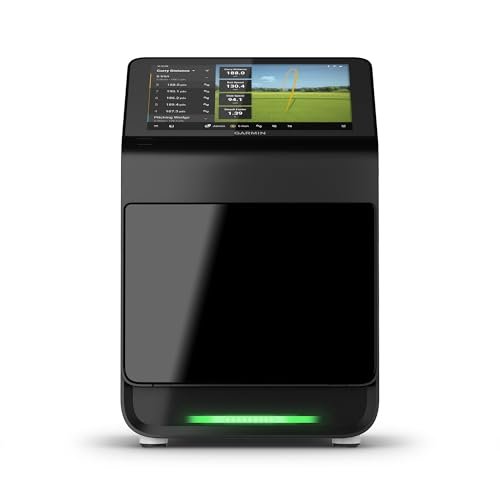
The Garmin R50 is a premium all-in-one option with a 10-inch touchscreen. It cuts the cords, the phones, and most setup friction. You get rich ball and club data in a single unit built for home sims. The interface is bright, simple, and easy to read from your mat.
This is the kind of device that makes a hitting bay feel like a full studio. It’s built for fast sessions and easy family use. Expect robust sim features and a clean workflow. If you want less fiddling and more golf, it fits that brief very well.
Pros:
- 10-inch built-in touchscreen feels like a studio monitor
- All-in-one design reduces setup and device juggling
- Rich data set for ball and club
- Great for dedicated home sim spaces
- Sleek interface with fast feedback
Cons:
- Higher price than compact units
- Larger footprint and less travel-friendly
- Some advanced sim content may require subscriptions
My Recommendation
If you want a premium, streamlined setup, the R50 is a standout. It delivers a polished studio feel without extra screens. For many home golfers, it is the Best golf launch monitor for simulators that aim for “family ready” and “pro feel” in one device.
| Best for | Why |
|---|---|
| Dedicated sim rooms | Touchscreen and all-in-one design |
| Simple workflows | Minimal setup and quick feedback |
| Data-driven players | Deep ball and club metrics |
Uneekor Eye MINI CORE Launch Monitor

The Uneekor Eye MINI CORE brings near-zero latency and 15 ball data points. It’s built for indoor reliability and fast feedback. Uneekor’s camera tech captures spin and launch traits with strong repeatability. The result is a stable, studio-like session at home.
This version works with popular sim software like GSPro, TGC 2019, and E6. You will need a PC or laptop to run those tools. Once set, the system is very smooth and responsive. It earns trust quickly thanks to its crisp, repeatable reads.
Pros:
- Near-zero latency helps timing and rhythm
- 15 ball data points for deep insight
- Strong indoor reliability with camera-based tracking
- Works with GSPro, TGC 2019, and E6
- Build quality feels premium and durable
Cons:
- Requires a Windows PC or laptop
- Higher cost than entry units
- Software setup has a learning curve
My Recommendation
If you want a studio feel and sim-level precision, this is a top choice. I like it for players who care about spin, launch windows, and wedge control. It belongs on any list of the Best golf launch monitor for simulators, especially for PC-based setups.
| Best for | Why |
|---|---|
| Data-focused golfers | 15 ball metrics and fast, stable reads |
| PC sim users | Works with GSPro, TGC 2019, and E6 |
| Wedge gapping | Reliable spin and launch tracking |
Swinora Portable Golf Launch Monitor

The Swinora is a budget-friendly swing analyzer with sim flair. It offers 3D ball flight in a simple app and supports iOS and Android. It is easy to carry, easy to charge, and quick to pair. For basic practice and casual course play, it can be enough.
It does not aim to rival premium accuracy. Think of it as a starting point to build a practice habit. The focus is on fun and feedback more than deep data. For new golfers or family rooms, it can be just right.
Pros:
- Very affordable entry to sim-style practice
- iOS and Android support
- 3D trajectory gives simple visual feedback
- Lightweight and easy to set up
- Good for casual play and family fun
Cons:
- Fewer metrics than mid to high-end devices
- Accuracy is basic and best for casual use
- Software polish varies versus big brands
My Recommendation
On a tight budget? Try Swinora to see if sim practice sticks for you. It is not for gear heads who want every metric. But for a fun start at home, it has a place. It will not be the Best golf launch monitor for simulators for purists, yet it nails simple fun.
| Best for | Why |
|---|---|
| First-time users | Low cost and simple setup |
| Family play | 3D visuals and easy app |
| Casual practice | Enough data for light training |
Voice Caddie SC4 PRO Launch Monitor

The SC4 PRO packs a built-in display and a no-fees style that many golfers love. It tracks key ball metrics and plugs into a 3D range app. The screen is bright and usable, so you don’t need a phone for every session. It’s a grab-and-go device that still feels sim-ready.
It won’t match the depth of premium systems. But for training and casual rounds, the feedback is quick and useful. I like it for simple setups and shared spaces. It’s a nice bridge between bare-bones trackers and full studio rigs.
Pros:
- Built-in screen means fewer devices
- No subscription fees noted for core use
- 3D range app adds simulator flavor
- Fast, simple setup indoors or outside
- Great for casual or shared environments
Cons:
- Not as deep on metrics as high-end units
- Spin axis and curve less robust than premium devices
- Limited advanced sim features
My Recommendation
If you hate juggling phones and cables, the SC4 PRO is refreshing. It’s best for quick sessions and simple sim play. If your needs are modest, it can be the Best golf launch monitor for simulators in a no-fuss home bay.
| Best for | Why |
|---|---|
| No-fuss setups | Built-in display and simple UI |
| Casual practice | Key metrics and fast reads |
| Shared spaces | Easy for family or friends to use |
SkyTrak Launch Monitor (30-Day Trial)

SkyTrak has long been the go-to photometric monitor for home sims. It reads ball speed, launch angle, backspin, and sidespin with strong indoor reliability. The ecosystem of sim software is broad and proven. The 30-day trial for the Game Improvement plan lets you sample advanced tools.
It is not the newest, but it is trusted. Lighting and ball position matter here, so follow setup tips. Expect a slight delay compared to radar, which is normal for camera-based units. For tight indoor spaces, SkyTrak still shines.
Pros:
- Accurate ball data for indoor sims
- Broad software compatibility
- Proven choice for many home bays
- Great for wedge work and spin control
- Trial access to deeper practice features
Cons:
- Setup sensitive to lighting and ball placement
- Slight shot-to-screen delay versus radar
- Not as portable as ultra-compact units
My Recommendation
If you want a tested camera-based monitor for indoor play, SkyTrak belongs on your list. It still delivers accurate ball data and smooth software support. For many users, it ranks as a Best golf launch monitor for simulators in tight spaces with a focus on ball flight honesty.
| Best for | Why |
|---|---|
| Indoor-only bays | Photometric tracking thrives indoors |
| Spin-focused players | Backspin and sidespin detail |
| Software explorers | Strong integration with sim platforms |
Voice Caddie SC200 Plus Launch Monitor

The SC200 Plus is a simple, voice-enabled practice tool. It gives you carry distance, swing speed, ball speed, and smash factor. You get a remote for quick club changes and practice modes. The battery life keeps you going for long sessions.
This is not a simulator unit. It’s a range partner that builds awareness of your numbers. If all you want is speed, carry, and a clean flow, it’s great value. For indoor sims, look at the other devices on this list.
Pros:
- Budget-friendly and easy to use
- Voice feedback speeds practice
- Remote control for quick club switching
- Good battery life
- Solid for distance gapping
Cons:
- No true simulator features
- Limited metrics versus more modern devices
- Best suited to the range, not tight indoor nets
My Recommendation
Use the SC200 Plus if you want a simple, low-cost training partner. It is not for sim play. But it does the basics well and keeps you focused. If you need the Best golf launch monitor for simulators, pick a unit above; if you need simple speed and carry, this is fine.
| Best for | Why |
|---|---|
| Budget practice | Low price and fast voice feedback |
| Distance gapping | Carry and smash factor insights |
| Outdoor range users | Portable with strong battery life |
FAQs Of Best golf launch monitor for simulators
Do I need marked balls for accurate spin indoors?
Some devices do. Rapsodo MLM2PRO needs marked/RPT balls for true spin axis. Camera-based units like SkyTrak read spin without special balls.
How much space do I need for a home simulator?
Plan for about 8 feet behind the ball and 8–10 feet of ball flight. Height of 9–10 feet is ideal for drivers. Always check each device’s spacing guide.
Is radar or camera better indoors?
Camera units often shine in tight indoor spaces. Radar needs more ball flight. Many hybrid systems combine both for better accuracy.
What software should I use?
Popular picks include E6 Connect, GSPro, TGC 2019, and Awesome Golf. Pick the one that fits your courses, budget, and PC/mobile platform.
Can I use these monitors outside too?
Yes, many work outdoors. Radar units like Garmin R10 excel at the range. Follow setup tips and avoid heavy interference.
Final Verdict: Which Should You Buy?
Want the Best golf launch monitor for simulators at a fair price? Garmin R10 and Rapsodo MLM2PRO deliver strong value and simple setups. Want a premium, polished bay? The Garmin R50 and Uneekor Eye MINI CORE feel like studio gear.
Need a proven indoor classic? SkyTrak still hits. For no-fuss fun, Voice Caddie SC4 PRO works well. Choose based on space, software, and how deep you want the data pool to be.